
How to Use the Tula Microphone with Macbook and iPhone for Online Teaching
Looking for a great microphone to record yourself playing the violin? Perhaps you teach violin online and are needing a super portable and powerful microphone for your online lessons?In this post, I will share what I have found that works great for me after years of research.
I’m really excited to show you the microphone that I am using now currently when I teach online and when I record myself playing the violin.
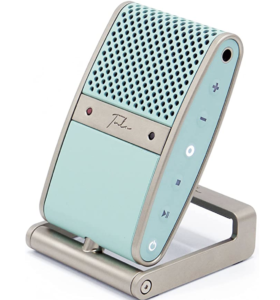
I am beyond excited to have found this microphone it’s called the Tula mic, t-u-l-a. It’s adorable, compact, and portable what more could you ask for in a microphone. If you want to hear firsthand the quality of the sound, watch the video above.
What I love about this microphone is it’s great for voice and also for the violin. In making the video above, I used a lavalier mic connected to the Tula microphone which is connected to the iPhone that I used to record the video.
On either side of the microphone, you have adorable little buttons. You have an on-off button, your record button and then also on the other side you have the button to choose for the lavalier mic and for noise cancellation as you’re recording. Noise cancellation is a great option to have while teaching online in case you have the dishwasher running, washer machine, noise coming through the window, etc.
Using the Tula mic for online teaching via Zoom
It connects very easily to Zoom and to your iPhone or any device you want to make videos, with a smartphone, any apps on the iPad or tablet and it also records the violin or musical instrument very beautifully.
For my online teaching, I choose to use Zoom. While I am a traveling nomad, I am teaching from my MacBook but when I am at my home office, I teach from my iMac.
In order for the Tula mic to connect to my Macbook Pro 2020, I had to purchase a USB adaptor. The Tula mic comes with a cable that attaches to the back that you easily plug into the USB of the computer that you’re using. Since I’m using a MacBook pro, I plug the Tula into the adapter. Now you know that the Tula microphone is connected when it pops up on the computer. In the Zoom platform, you need to go in and select your microphone settings to select the Tula microphone. If you don’t select the Tula mic, it’s not going to work as a Tula mic. You know the Tula mic is working when you have a red light appear on your Tula microphone.
The Tula mic has its own little stand that opens up and then it’s able to sit down very nicely without any issue. You can change out the stand and connect it to a stand mic if you want to.
You can remove the stand via a simple quarter turn.
The Tula mic is extremely compatible and portable. It can fits in your backpack super easily so it can go anywhere you go. It can fit in your violin case and your pocket even.
It does have a carrying case that you can purchase separately. However, I do not have the carrying case since it wasn’t available at the time for international orders.
Using the Tula mic for recording & playback
The Tula mic is excellent to use for your practice sessions. You can easily record yourself and playback to hear how you are sounding on the violin.
The one thing the Tula microphone does not have is a speaker. You are unable to playback with the Tula microphone alone because it does not have a speaker. However, if you connect headphones to the Tula mic you will be able to hear yourself through the headphones.
Using the Tula mic for video recordings on your iPhone
The Tula mic also works if you want to make video recordings with your phone. If you’re using an iPhone you will have to get a camera adapter that connects to the phone. This allows you to have the USB for the Tula while you are making videos with your phone.
If you choose to use a lavalier mic for the phone videos, you can connect it through your Tula microphone. Simply connect your lavalier mic to the Tula mic via the hole on the side (same hole for the headphones.) To break it down: you have your camera adapter and your Tula mic connected with the lavalier mic connected to the Tula.
So those are the two ways that I use Tula in my online teaching, my video making, for recording myself, and being able to play back to hear really nice recordings for the violin.
So if you’re a musician, I would highly recommend the Tula mic if you’re an online teacher of an instrument. I would recommend the Tula mic because it’s great for the voice and also for the instrument.
Enjoy using the Tula and let me know in the comments below if you do use a Tula and how you like it.
Have fun using the Tula mic. Ciao.


Leave a Reply
Want to join the discussion?Feel free to contribute!